Digital systems for a small school
Part of running my own online school for architects and designers has been making sure its digital systems work together. From a student’s point of view, it looks simple: choose a course on our website, pay and start learning. Off-the-shelf tools can cover each step. With 30 to 40 products, the challenge is keeping costs down and making the whole setup manageable for a small team. Over eleven years, I’ve had to decide what to build, what to buy and how to connect a dozen or so systems covering enrolment, scheduling, video, analytics and expense management.
(2015–2026)
for my own company, Soft Kultura
11 years
The problem
A small school needs much the same infrastructure as a large one. We need a website where students can browse and pay for courses, a way to track what we offer, which groups are filling up and where each application stands. We also need a CRM, email, a learning platform, video, expense tracking and analytics.
Off-the-shelf tools rarely work together out of the box. Someone ends up copying data between them, granting students access, filing recordings or piecing together a report. A school our size has no in-house development team. Even modest subscriptions add up when several services charge per user or by usage.
What I built
From the start, I was responsible for the school’s digital infrastructure as a whole. How we handled each part depended on what the team needed.
- We build our own tools when the work is central to the school and we can’t find a good fit. That includes our course catalogue and checkout, and the video pipeline we use to process, store and securely stream both prerecorded lessons and recordings of live classes.
- We use low-code and no-code tools for internal apps where flexibility and an interface that suits the team matter more than scale. We use them to manage courses, enrolment, applications and payments, to plan and track expenses, and to give staff views of the data they need for day-to-day work.
- We buy established services for jobs other teams have already solved well. These include CRM, video calls for live classes, email delivery, financial reporting, web analytics, forms and surveys.
- We host and adapt open-source software when it suits us. For example, we run Moodle with our own design and integrations in place of a commercial learning platform, and Baserow in place of Airtable.
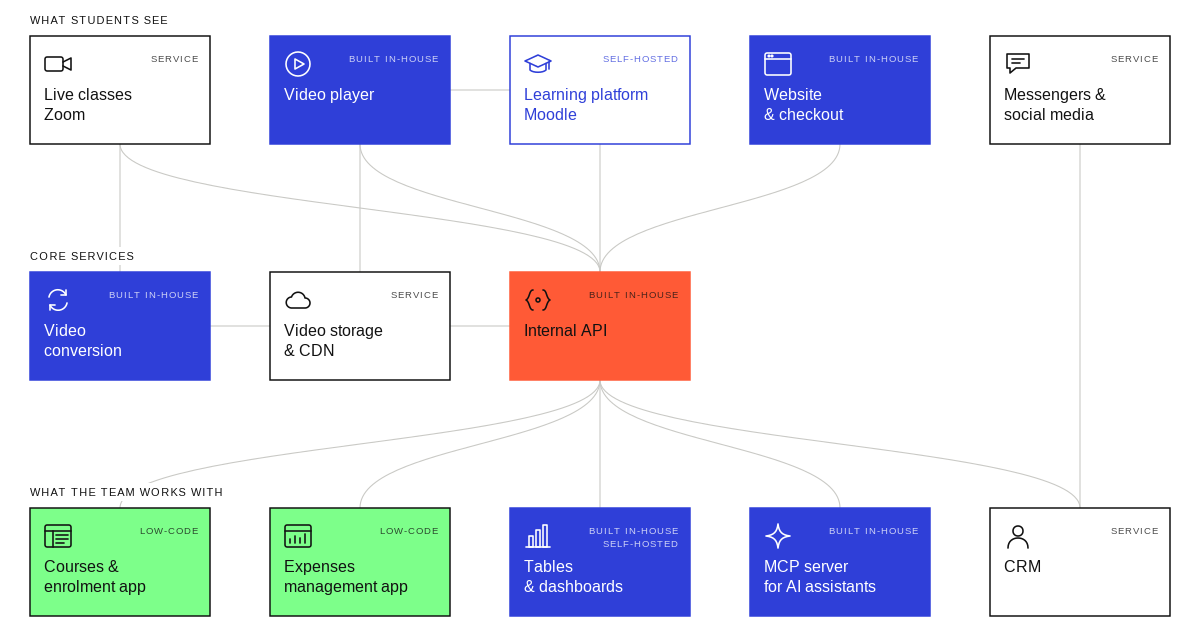
The part students and staff never see is our internal API. It lets data move between any of the school’s systems, whether we built them ourselves or use an existing service. For example, it schedules classes across a limited number of Zoom accounts and gets each recording into the right course on the learning platform. It also links ad campaign data and page traffic to enrolment figures for a particular course intake.
The result
- The school has run on these systems for eleven years, through the move online, growth, the pandemic and sharp shifts in the market. We’ve never depended on a single contractor or platform.
- Almost all the recurring work that moves information between systems now happens automatically.
- When a service became too expensive or stopped meeting our needs, we could replace it without rebuilding the rest.
How it works
- Website. Our PHP application has its own admin interface. Staff create course pages by filling in fields in a shared template. Students pay on the site.
- Internal apps. Our main low-code app tracks courses, groups, applications and payments, and holds the team’s email templates. Our finance manager uses a separate app to plan and track expenses. Staff use our self-hosted Baserow to maintain course outlines and view operational data.
- Learning platform. We host Moodle on our own server, with a custom theme and additional JavaScript for integrations.
- Video. We store tens of thousands of prerecorded lessons and class recordings on AWS and Selectel and stream them via a CDN. A Python service retrieves class recordings from Zoom on a schedule, converts them to HLS and files them in storage. Students watch them in our own player inside Moodle.
- Internal API. Written in Python with Flask, it passes application and payment data between systems, manages access to courses and videos, and automates scheduling and recording management. It also collects data for reports, the team’s internal data views and our MCP server.
- External services. The API connects to services for communication with clients and lead management, email delivery, financial reporting, analytics and advertising, forms and surveys, and file management.